
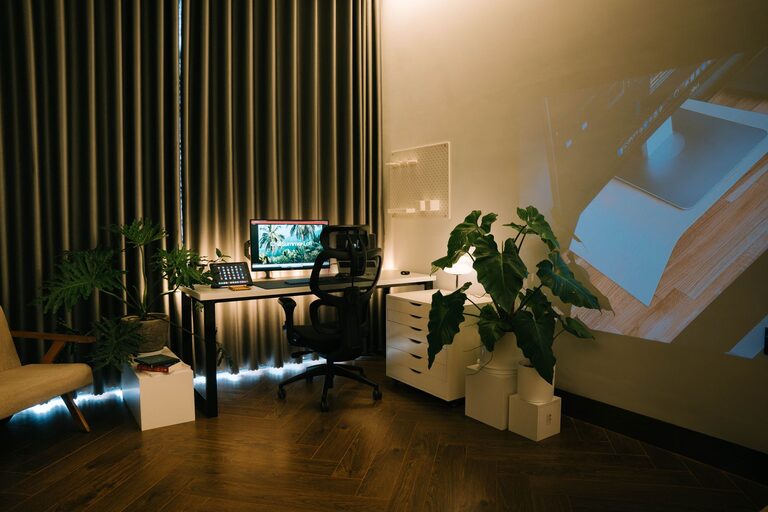
Creating a home office that feels both cozy and productive can greatly improve your work-from-home experience. Whether you have a dedicated room or just a small corner, designing a space tailored to your needs helps boost focus, reduce stress, and encourage creativity. In this post, we’ll explore practical tips to make your home office both inviting and efficient.
Choose the Right Location
The first step in setting up your home office is selecting the best spot. Ideally, this should be a quiet area with minimal distractions.
– Natural Light: Position your desk near a window to take advantage of daylight, which helps reduce eye strain and improves mood.
– Low Traffic: Avoid areas with frequent household activity to maintain concentration.
– Comfortable Space: Ensure there’s enough room for your furniture and gear without feeling cramped.
If a separate room isn’t available, consider using room dividers or screens to create a dedicated workspace.
Invest in Comfortable and Functional Furniture
Furniture plays a key role in both comfort and productivity. Choose pieces that support good posture and fit your space.
– Ergonomic Chair: An adjustable chair with proper lumbar support reduces back pain during long work hours.
– Desk Size: Pick a desk with enough surface area for your computer, documents, and accessories.
– Storage Solutions: Use shelves, drawers, or filing cabinets to keep your workspace tidy and organized.
Remember, comfort reduces distractions caused by discomfort, and having things within reach saves time.
Optimize Lighting
Good lighting can reduce eye strain and enhance focus.
– Mix Light Sources: Combine overhead lighting with desk lamps to create a balanced environment.
– Adjustable Lamps: Use lamps with adjustable brightness and angle to suit different tasks.
– Avoid Glare: Position screens and lights to minimize reflections on your monitor.
If natural light is limited, consider daylight-balanced bulbs that mimic natural light.
Personalize Your Space
Adding personal touches makes your office more inviting and encourages you to spend time there.
– Plants: Small indoor plants improve air quality and add a calming green touch.
– Artwork: Display artwork or photos that inspire you.
– Decor: Use colors and textures that make you feel comfortable, such as soft rugs, cushions, or curtains.
Personal elements create a positive atmosphere, making work feel less like a chore.
Keep Your Workspace Organized
Clutter can hinder productivity. Maintain an organized area to help your mind stay clear.
– Declutter Regularly: Remove unnecessary items at the end of each day.
– Use Organizers: Desk trays, pen holders, and cable organizers keep essential items in order.
– Digital Organization: Keep your computer files and emails sorted for quick access.
An orderly space reduces stress and saves time looking for things.
Incorporate Technology Wisely
Technology is essential, but it shouldn’t overwhelm your workspace.
– Reliable Equipment: Invest in a good computer, high-speed internet, and essential peripherals like a keyboard, mouse, and headphones.
– Cable Management: Use clips or sleeves to keep cords tidy and prevent tangles.
– Backup Solutions: Regularly back up your work to avoid data loss.
Technology should serve your productivity without creating distractions or clutter.
Set Boundaries Between Work and Personal Life
Creating mental separation between work and home life is important when your office is at home.
– Designate Work Hours: Stick to a schedule to maintain balance.
– Leave Your Desk: When work is done, leave your office space to relax.
– Use Visual Cues: Closing the office door or covering your laptop signals the end of the workday.
Boundaries help reduce burnout and keep work from spilling into personal time.
Add Comfort Enhancers
Adding a few comfort items can help keep you relaxed and focused.
– Temperature Control: Use fans, heaters, or a humidifier to keep the environment comfortable.
– Ergonomic Accessories: Consider wrist rests, footrests, or standing desk converters for added comfort.
– Break Area: If space allows, have a small area nearby for stretching or short breaks.
Comfort support your physical well-being, which contributes to consistent productivity.
Final Thoughts
Creating a cozy and productive home office is about balancing functionality with comfort. By choosing the right location, investing in ergonomic furniture, optimizing lighting, and personalizing your space, you set yourself up for success. Keeping the workspace organized and technology streamlined further enhances efficiency. Don’t forget to set clear boundaries and include comfort features to maintain your well-being. With these tips, your home office can become a place you look forward to working in every day.